



随着越来越多的站长开始重视seo了,对rel="nofollow"也在乎得多了。但是由于百度编辑器ueditor并不自带rel="nofollow"功能,在引入其他站点URL链接的时候,就会导致蜘蛛流失,自己的网站权重下降。
今天热站模板网整理了一下,来教大家怎么改,让ueditor的link自带rel="nofollow"标签,话不多说,直接上图。
1、找到/core/extend/ueditor/dialogs/link/link.html,修改第81行。
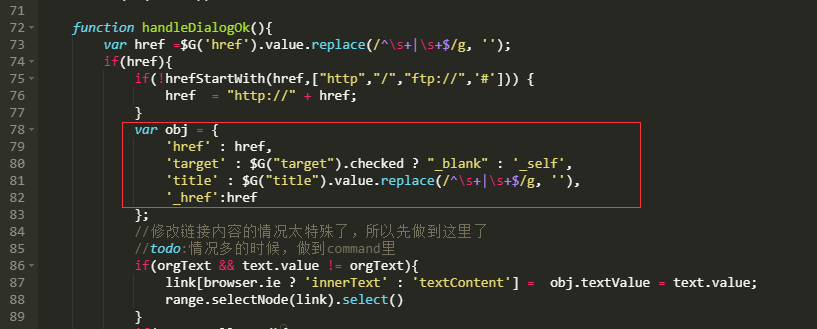
1    'href' : href,
2    'target' : $G("target").checked ? "_blank" : '_self',
3    'title' : $G("title").value.replace(/^s+|s+$/g, ''),
4    '_href':href
改成:
1    'href' : href,
2    'target' : $G("target").checked ? "_blank" : '_self',
3    'title' : $G("title").value.replace(/^s+|s+$/g, ''),
4    'rel': 'nofollow',
5    '_href':href
2、找到/core/extend/ueditor/ueditor.config.js,修改第370行。
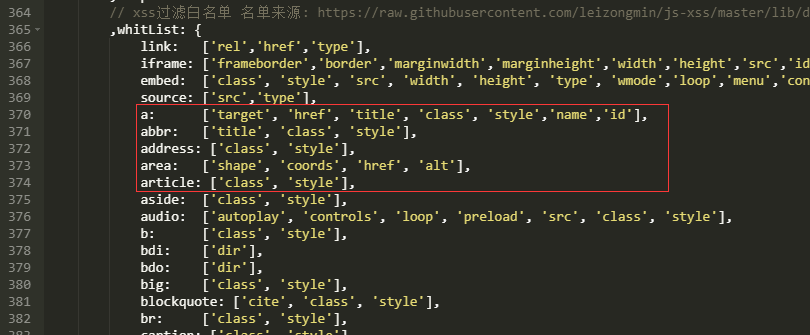
1    a:      ['target', 'href', 'title', 'class', 'style','name','id'],
2    abbr:   ['title', 'class', 'style'],
3    abbr:   ['title', 'class', 'style'],
4    area:   ['shape', 'coords', 'href', 'alt'],
修改成:
1    a:      ['target', 'href', 'title', 'class', 'style','name','rel','id'],
2    abbr:   ['title', 'class', 'style'],
3    abbr:   ['title', 'class', 'style'],
4    area:   ['shape', 'coords', 'href', 'alt'],
上述两个文件修改好就可以实现rel="nofollow"了,网站后台测试添加链接,测试成功,演示图如下。

文章搜集与网络,如有侵权请联系本站,转载请说明出处:https://www.rezhanwang.com/pbootcms/3777.html